Pipeline stages: track where each lead is
What each stage means, how to move a lead from one stage to the next, and a simple flow for your kind of business.
- Time:
- about 6 min · 6 steps
- You need:
- A few leads in Kylip · 6 minutes
Every lead in Kylip has a stage (Kylip also calls it Status). It tells you and your team where that person is: just arrived, spoken to, interested, joined, or not going ahead. Every workspace uses the same 12 stages. You don't have to use them all: most businesses use five or six.
What each stage means
The first seven stages are open: someone still needs to act. The last five close the lead.
Kylip's stages, in order
- Stage
- New
- What it means
- Just arrived. Nobody has responded yet.
- Open or closed
- Open
- Stage
- Not contacted
- What it means
- A lead that hasn't been contacted yet.
- Open or closed
- Open
- Stage
- Attempted contact
- What it means
- You tried to reach them and are waiting for a reply.
- Open or closed
- Open
- Stage
- Contacted
- What it means
- You spoke with them or reached out.
- Open or closed
- Open
- Stage
- Follow-up
- What it means
- You spoke with them and they need another touch.
- Open or closed
- Open
- Stage
- Pre-qualified
- What it means
- First checks done, looks promising.
- Open or closed
- Open
- Stage
- Qualified
- What it means
- A good fit and ready to go ahead.
- Open or closed
- Open
- Stage
- Converted
- What it means
- They became a paying customer.
- Open or closed
- Closed
- Stage
- Not qualified
- What it means
- Doesn't meet what you need right now.
- Open or closed
- Closed
- Stage
- Disqualified
- What it means
- Ruled out because of a mismatch or not eligible.
- Open or closed
- Closed
- Stage
- Junk
- What it means
- Spam, fake or duplicate. Not a real enquiry.
- Open or closed
- Closed
- Stage
- Lost
- What it means
- Decided not to go ahead.
- Open or closed
- Closed
Move a lead to another stage
Changes save straight away. A message at the bottom of the screen confirms the move and offers Undo.
Step 1: Change it in the Leads list
In the left menu, click Leads. In the Status column, click the coloured stage on a lead's row.
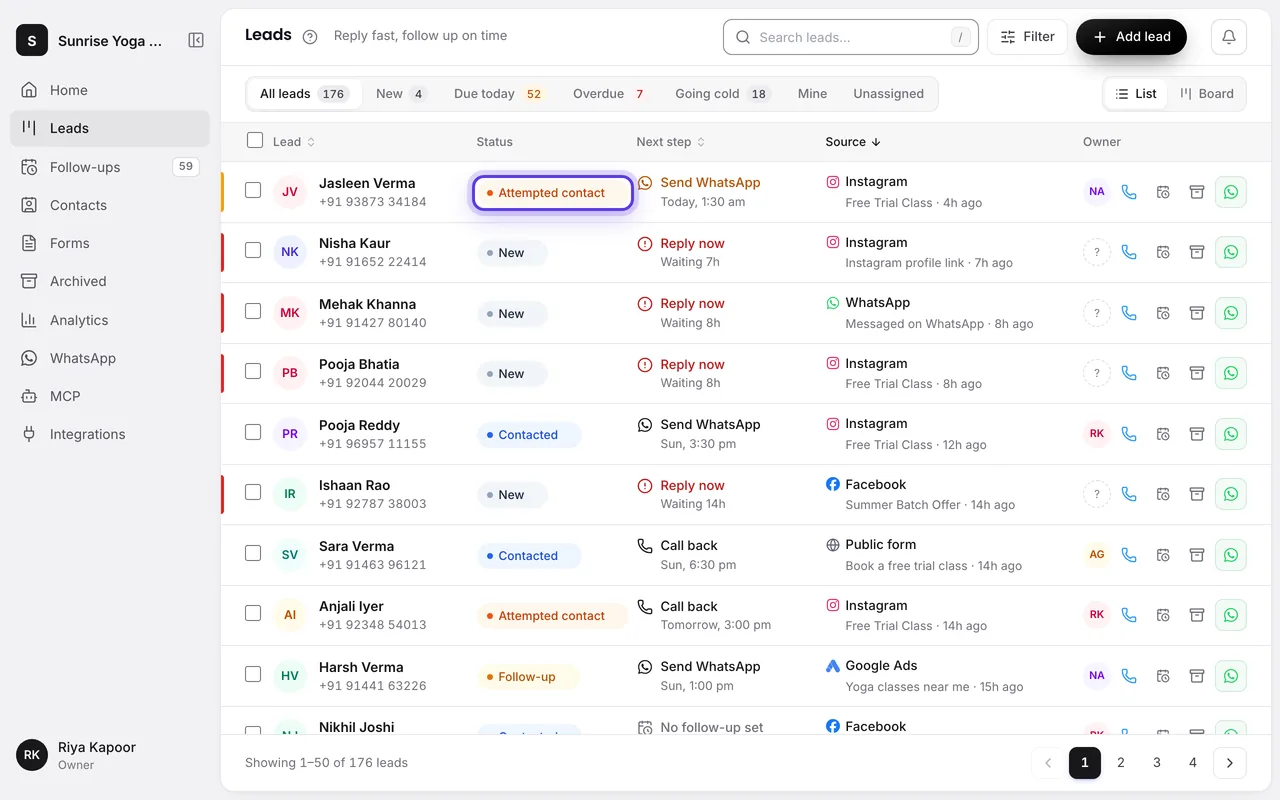
Each row shows its stage. Click it to change it. Step 2: Pick the new stage
A list of all 12 stages opens. Click the one that fits. The row updates at once.
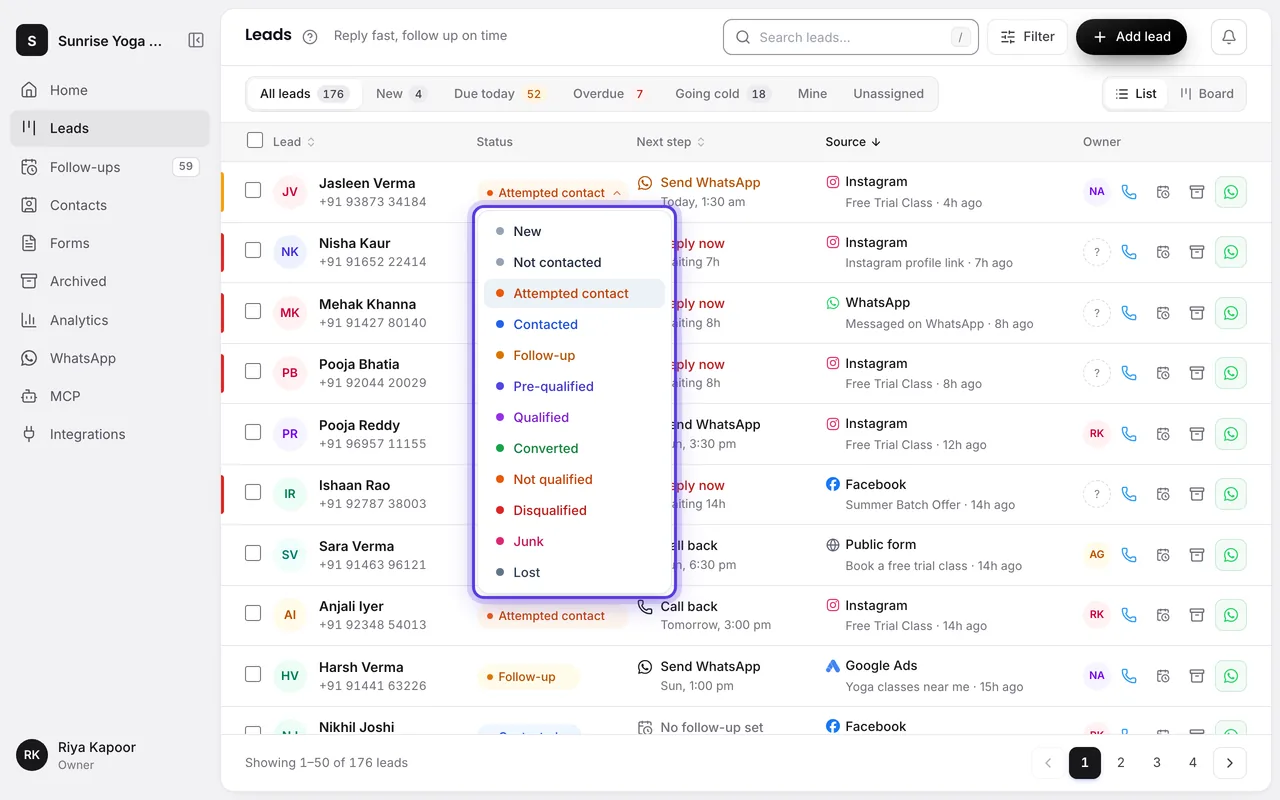
The stage list, with the current stage shaded. Step 3: Or drag cards on the board
Click Board at the top right of the Leads page to see one column per stage. Drag a lead's card into another column to move it. On a phone, use the stage on each card instead of dragging.
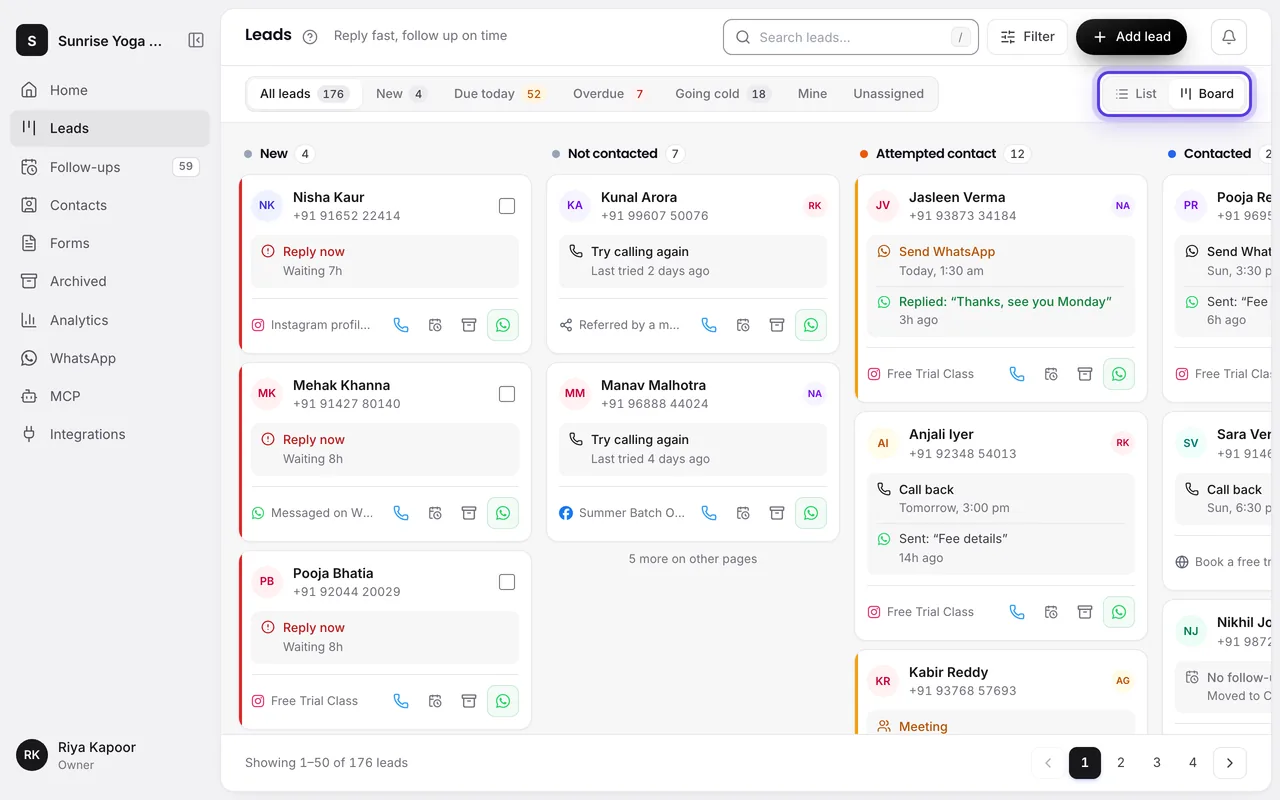
Board layout: one column per stage. Step 4: Or use the steps on a lead
Open a lead. The bar at the top shows the usual path: New, Attempted contact, Contacted, Follow-up, Qualified, Converted. Click a step to move the lead there. You can also change Status under Lead details.
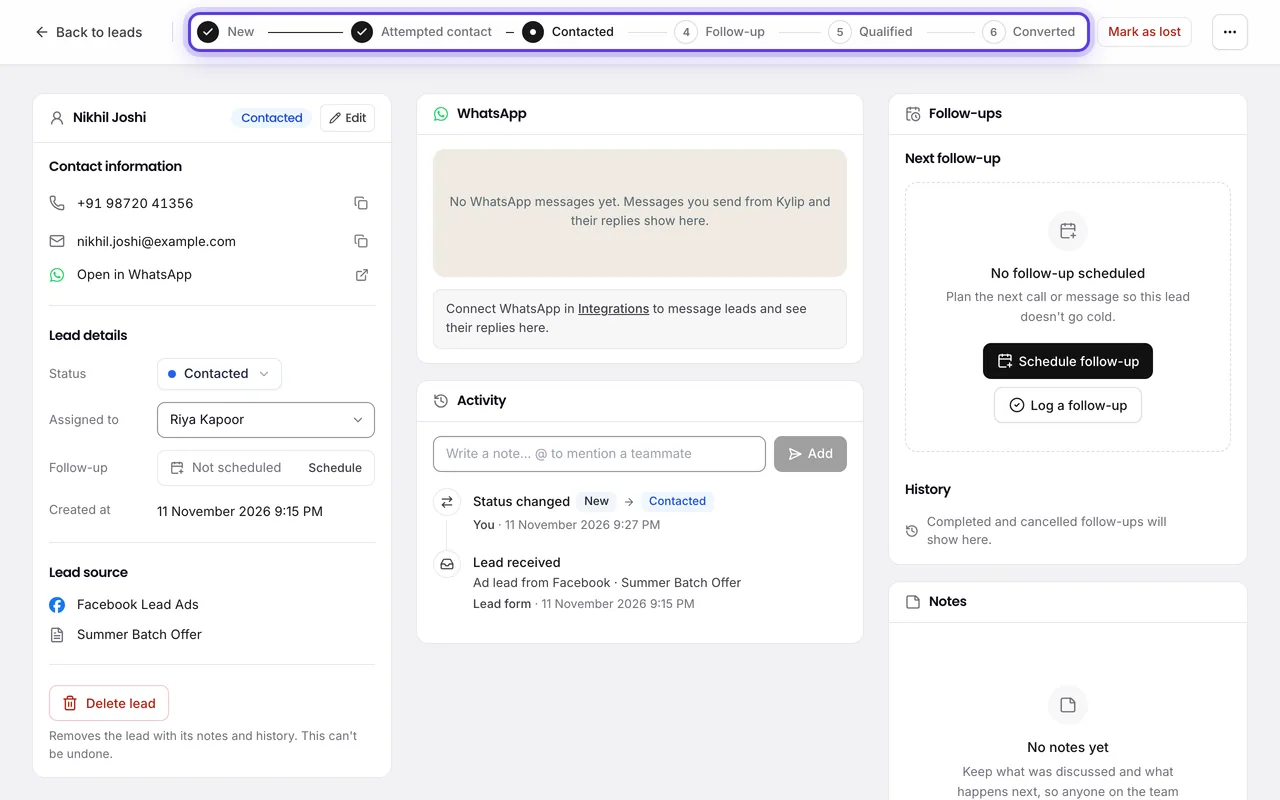
The steps at the top of a lead's page. Step 5: Move several at once
In the list, tick the box beside each lead. A bar appears at the bottom: click Change status and pick the stage.
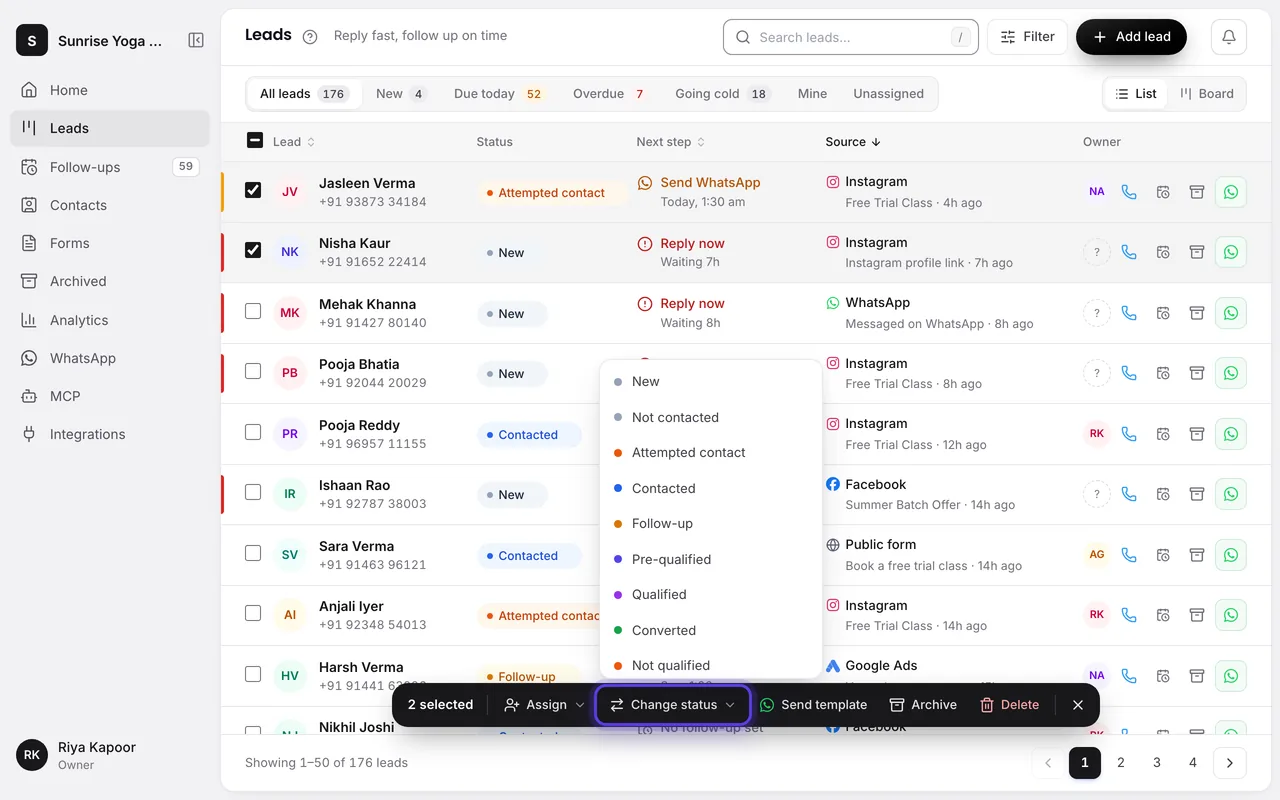
Tick leads, then Change status.
Mark a lead as lost
Step 6: Pick a reason
Click Mark as lost on the lead's page, or choose Lost from the stage list. Pick a reason: Not interested, Too expensive, Chose a competitor, Timing isn't right, Not a fit, Stopped responding, or Other to type your own. Then click Mark as lost.
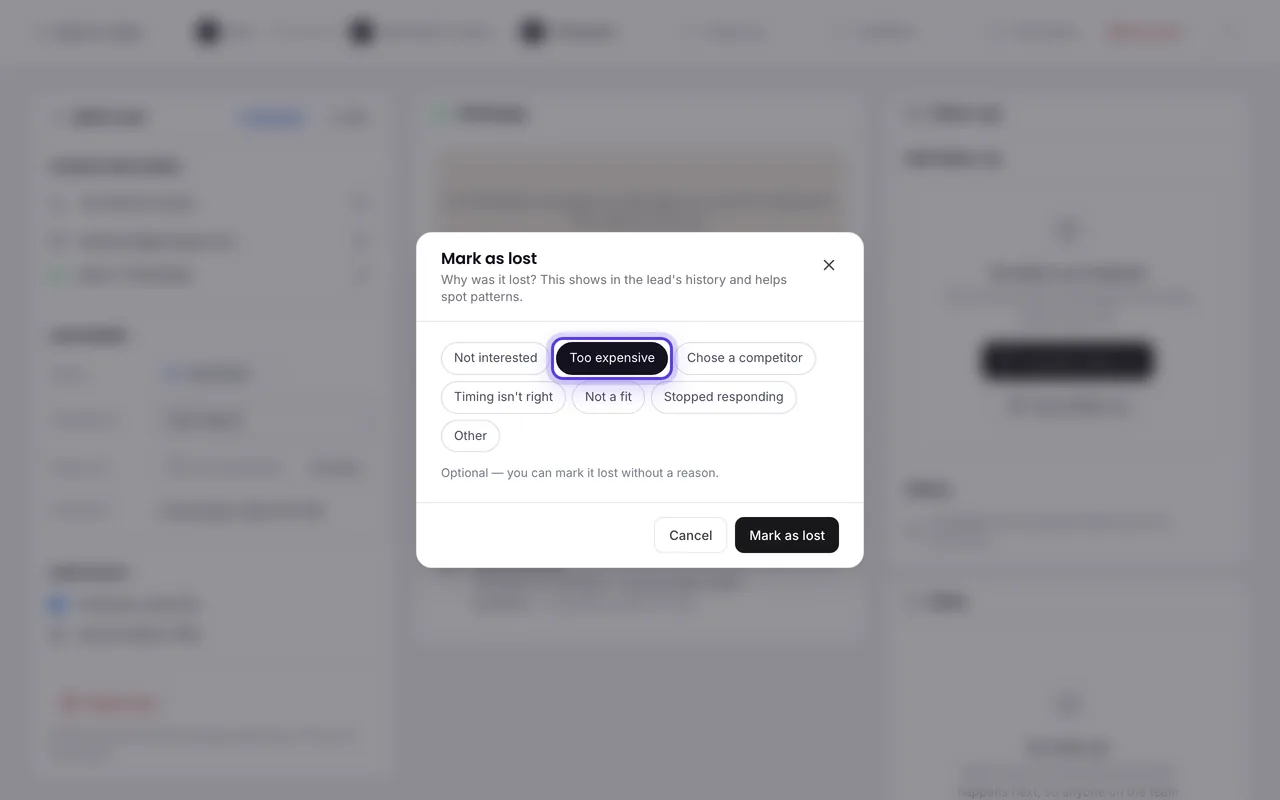
The reason shows in the lead's details and history.
A simple flow for your business
Pick the few stages that match how you work and ignore the rest. Here are some starting points, using Kylip's own stages.
Suggested flows
- Business
- Coach
- A simple flow
- New → Contacted → Follow-up → Qualified → Converted
- What the key stages mean for you
- Qualified: discovery call done and they want to join. Converted: paid for the programme.
- Business
- Yoga or dance studio
- A simple flow
- New → Attempted contact → Contacted → Qualified → Converted
- What the key stages mean for you
- Qualified: booked a free trial class. Converted: joined a batch.
- Business
- Clinic
- A simple flow
- New → Contacted → Qualified → Converted
- What the key stages mean for you
- Qualified: appointment booked. Converted: came in for the visit. Not qualified: needs a service you don't offer.
- Business
- Tutor or coaching class
- A simple flow
- New → Contacted → Follow-up → Pre-qualified → Qualified → Converted
- What the key stages mean for you
- Pre-qualified: attended a demo class. Qualified: fees shared and parent agreed. Converted: fees paid.
Common problems
Can I rename the stages or add my own?
No. Every workspace uses the same 12 stages, so reports and automations work the same for everyone. Use the ones that fit and ignore the rest.
I moved a lead by mistake.
Click Undo in the message at the bottom of the screen straight after the move. Otherwise, just move it back.
I can't drag cards on the board.
Dragging works on a computer. On a phone or tablet, tap the stage on the card and pick the new one. If your plan has ended, leads are read-only until you renew.
A lead disappeared from my list after I changed its stage.
Your list was showing only some stages, for example open leads. Click All leads at the top of the Leads page to see every stage.
What's the difference between Lost and Junk?
Lost is a real person who decided not to go ahead. Junk is spam, a fake entry or a duplicate. Junk is left out of your conversion and response numbers.
Was this helpful? Message us on WhatsApp
Still stuck?
Message the Kylip team on WhatsApp and a real person will help you. Or email info@kylip.app.